Cleaning Business Apps: Choose What You Need First
Choose apps for the cleaning work you need help with. Use a free decision sheet, a sample-job check and a real CleanerHQ demo screenshot.
 R Rashdi
·
April 20, 2026
·
7 MIN READ
R Rashdi
·
April 20, 2026
·
7 MIN READ
Quick answer
Pick an app for a job you need help with: booking visits, sharing crew notes, keeping the books or finding clients. Keep tools that already work. Use the free choice sheet below to check an app before paying for it.
This guide to cleaning business apps is for owners who manage their own clients and crews. Start with the work causing trouble. A solo cleaner and an owner with several crews may need different tools.
CleanerHQ publishes this guide. We checked the linked official pages on September 14, 2026 and opened our actual demo schedule. Vendor features below are marked as documented unless we say what we saw. We have not field-tested every app.
Download the app choice sheet
Get the free printable cleaning app decision sheet (PDF). Page one helps you choose; page two gives you a sample-job check. No account or email address is needed.
For each option, write down the task, your current tool, the problem and the feature you need. Add the plan limits, phone needs, full cost and way to export your records. Finish with one choice: keep what you have, try the app, or skip it.
Start with one problem
| What is happening? | What to look for |
|---|---|
| A date change gets lost in a group chat | A current schedule the cleaner can open on their phone |
| The cleaner keeps calling for job details | Assigned job notes and a clear list of cleaning tasks |
| You spend Sunday matching receipts and payments | A bookkeeping tool or process your bookkeeper can use |
| People cannot find how to book you | An accurate local listing and a clear contact or booking page |
| You pay for tools that do the same thing | A list of each app’s job, cost and renewal date |
For example, suppose you change a weekly clean but the cleaner sees the old date in a text thread. Your next app needs to make the right date easy to find. A logo maker will not fix that problem. This is a teaching example, not a customer result.
Choose cleaning business apps by the work they cover
Bookings, schedules and job notes
If you work alone, a calendar and a simple client list may still do the job. Keep one place for the current visit time, price and agreed tasks. When someone joins you, check what they can see and who can change a booking.
| Option | What the current source shows | What you still need to check |
|---|---|---|
| CleanerHQ | We opened the demo schedule and saw list and calendar views, job status and work needing a date. | Your own recurring-visit changes, crew access, data export and chosen plan limits. |
| ZenMaid | Its website describes maid-service scheduling, client messages, invoices and mobile job notes. Documented. | Run a sample repeat clean and check the full bill for your users. |
| Jobber | Its plan page lists scheduling, quotes and invoices, with features varying by plan. Documented. | Choose the right team size and plan, then try your own cleaning tasks. |
This is a short starting list, not a ranking. You only need to try the options that cover your main problem.
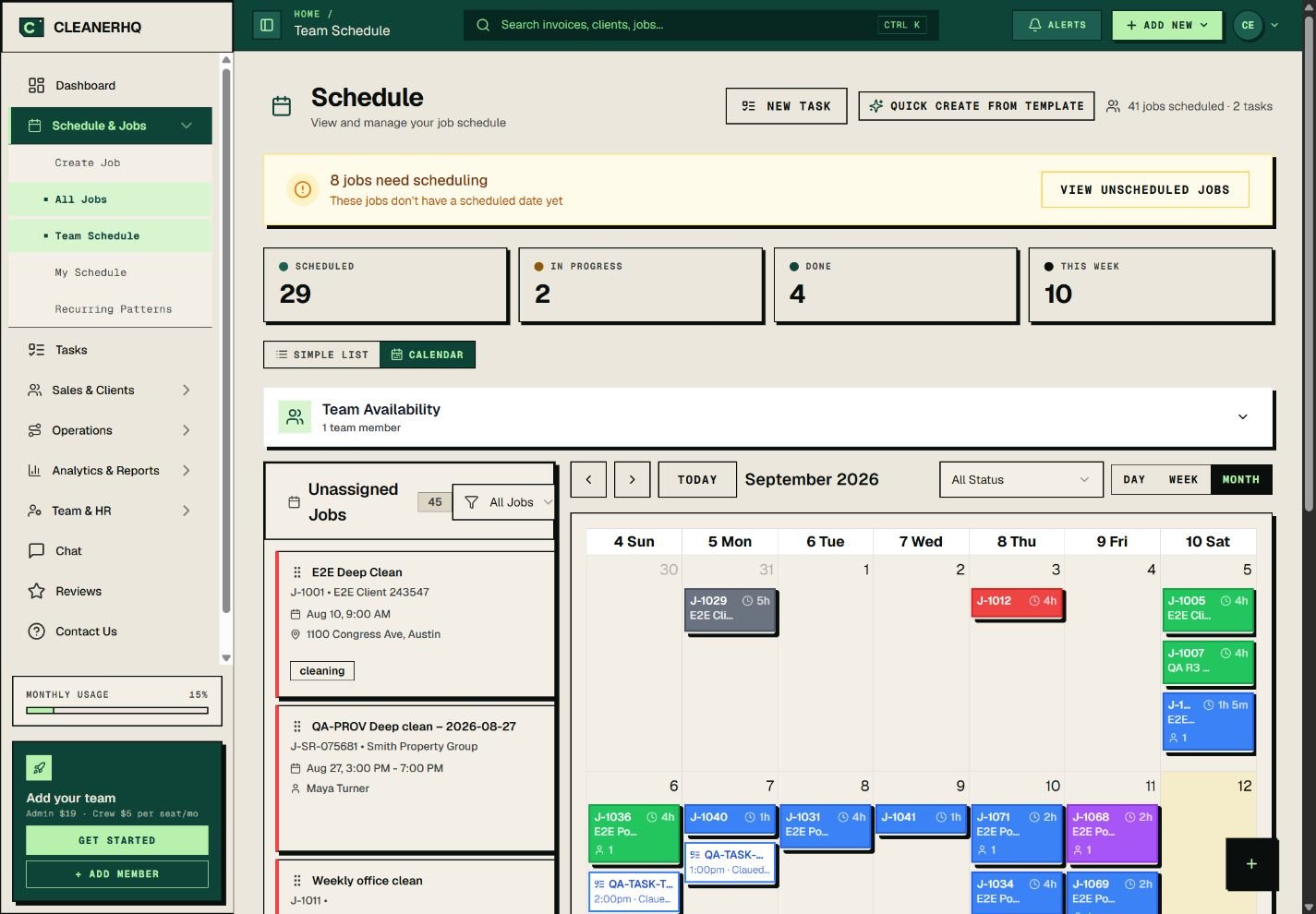
Use this screen to think through a real question: where would you look if a cleaner calls about tomorrow’s visit? Ask to see the date, address, assigned person and job notes together. Our client notes page shows the kind of job detail to check.
Bookkeeping
Start with the tool your bookkeeper already uses. QuickBooks documents income and expense tracking, invoices and reports. It has different plans and limits, so check the one that covers your work.
If you connect it to a job app, ask exactly which records move between them. Does a changed invoice update? What happens to a refund or a second payment? A link between apps does not mean every record moves correctly. Check those steps with your bookkeeper before relying on the connection.
Your local business listing
Google Business Profile is a free listing on Google Search and Maps for eligible businesses. Keep your name, service area, hours and contact details accurate. It helps people find your business details; it does not guarantee calls.
If you travel to clients and run a service-area business from home, follow Google’s address rules and hide your home address from customers. Keep your review requests open to honest feedback from all eligible clients.
Flyers and social posts
Canva offers a free starting point for designs such as flyers and social posts. Check whether the template, photo or feature you pick needs payment, and check its permitted use. You do not need a paid design plan just to keep the same phone number, logo and service details on your posts.
Routes, mileage and supplies
Add another app only when the job calls for it. For a small route, your usual map app can help you check addresses and travel time. Leave room for parking, getting inside and delays. Do not assume a scheduling app will reorder every stop when a visit changes.
A mileage app can help keep records, but it does not decide which trips qualify for tax deductions. Record the date, business destination, purpose and miles, and keep annual mileage totals. The IRS mileage guidance explains the details; ordinary commuting is not deductible. Check unclear trips with your tax adviser.
For supplies, start with a shared stock list and a named person who checks it. Consider a stock app when you need several crews to record what they take. Check that it solves the problem before adding another monthly bill.
Try one sample cleaning job before paying
Use made-up client details. Work through the steps below with a trial or a guided demo, and record what happens on page two of the choice sheet. Do not send real customers test messages or bills.
| Step | What a useful check looks like |
|---|---|
| Add a demo client | Save safe sample details and cleaning notes. |
| Arrange two visits | Move the second date and check the first stays put. |
| Open the cleaner view | Find the assigned visit and notes using the right access role. |
| Record the work | If you need time tracking or photos, try them and check who can edit them. |
| Draft a bill | Check price, tax and terms. Save it without sending it. |
| Export the record | Open the file. Check which details, notes and history it includes. |
If cleaners work with poor signal, try the phone tasks under that condition before relying on them. Record the result. A feature mentioned on a website is documented; one you tried successfully is tested. Use not checked when you do not know.
Check the full cost and choose
Count the office and crew users who need access. Add paid extras, text charges, payment fees and any setup cost. Card processing belongs in the budget once, including when a platform adds no markup. The earlier version of this guide wrongly described ordinary processing rates as a second fee on top of Stripe.
Use the cleaning software cost worksheet for the numbers. Before starting a paid plan, check the renewal price, first charge date and how to cancel. If the sample job leaves a key question unanswered, get an answer before moving your records.
Common questions
Can I run a cleaning business with free apps?
You can use free tools where they cover the work. Check user limits, invoices, storage and paid features. Keep a clear process for bookings and records, and pay for a new tool when it solves a problem you actually have.
Do I need one app for everything?
No. A few tools can work well together if you know where the correct schedule, client details and money records live. Avoid entering the same information twice when a reliable transfer or export can do the job.
Are these apps for finding cleaning gigs?
This guide covers tools for owners managing their own customers and team. A marketplace that offers individual cleaning jobs serves a different need. Check who owns the customer relationship and how that service charges you.
Bring one job to a CleanerHQ demo
CleanerHQ launches November 8, 2026. Use your choice sheet to check the steps your team needs.

Written by
Rashdi has spent 15+ years building and managing enterprise software, and has worked with US cleaning businesses since 2006. He founded CleanerHQ.