
CleanerHQ · For cleaning businesses
Keep repeat cleaning visits clear.
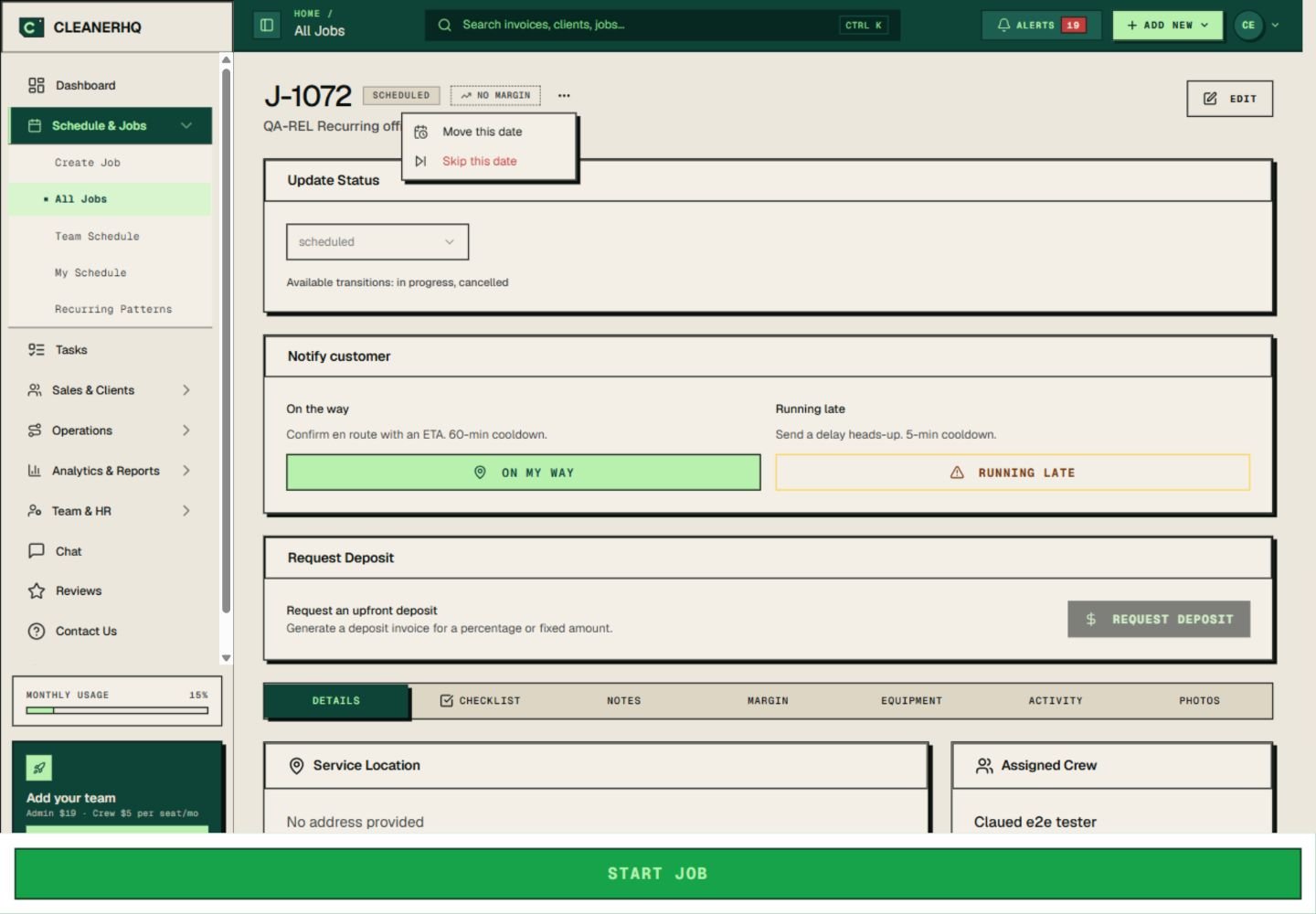
Use CleanerHQ’s recurring cleaning job records to follow each visit in a series. Open a visit to check the customer, crew, date, and work, or use its options to move or skip that date.
Recurring cleaning jobs in CleanerHQ create each visit in a series as its own job, with the customer, crew, date, checklist, and notes on it. The visit menu has “Move this date” and “Skip this date,” so you can change one visit while the rest of the series stays where it is.
- Keep the customer with each visit
- Check crew and job details
- Move or skip one date
1-minute overview · Filmed in the CleanerHQ app
See it with your own jobs.
Filmed in the CleanerHQ app with a demo account in October 2026. Names and amounts are sample data. Prefer a still? Open the full-size screenshot.
Read the video transcript
One regular customer. Many visits. Keep each one clear. In CleanerHQ, a recurring pattern creates each visit as its own job. Open one and everything is there: the customer, the crew, the checklist, and the notes that make this home different. Need to move a single date? Move only that one. The rest of the series stays where it is. A visit that shouldn’t happen? Skip it, and nothing is generated for that day. Your customer gets consistency. Your crew gets the details for the visit in front of them. Try CleanerHQ for yourself. Sign up for your 14-day free trial.
Review each recurring cleaning visit
Each visit needs its own record. Open the job to see the customer, assigned crew, scheduled time, and work details together.
Notes, checklists, equipment, activity, and photos have their own tabs on that page. Start there when you need to check what is planned for one clean.
Handle a change to one date
The visit menu includes “Move this date” and “Skip this date.” Start there when one visit needs a change.
Check the new time with the crew and customer before you confirm it. Then review the schedule so the rest of the day still fits.
Keep standing instructions current
A familiar site can still change. Update the entry steps and work limits when the customer’s needs change, even if the crew knows the site well.
Keep lasting details in customer notes. A request for this clean alone belongs with the visit.
Check the week around the visit
A series tells you when the customer’s work repeats. The team schedule shows how each visit fits with other jobs.
For several stops on the same day, also review the route plan. Leave room for travel and delays.
Questions about this feature
What does Service Sets mean on this website?
This page covers repeat cleaning work for a customer. In the app, open the recurring job to review the visit and its date options.
Can I handle one changed visit?
The recurring job menu has options to move or skip that date. Check the schedule and confirm the customer’s plan before saving a change.
See the related steps
- Cleaning Business Scheduling Software →
- Plan Recurring Cleaning Routes →
- Customer Notes for Your Cleaning Team →
- Cleaning Supply Tracking and Stock Checks →
See how the steps fit together in CleanerHQ’s cleaning business software.
Create your accountEmail us for a 15-minute demo →