Schedules built for routes,
not appointments.
Generic calendars schedule meetings. A cleaning business schedules recurring routes, swaps crews when someone calls in sick, and loses money to windshield time. CleanerHQ’s scheduling engine is built for exactly that — with a native mobile app your crew actually uses.
Start 14-Day Free Trial →See pricing
Scheduling software for a cleaning business needs four things a generic calendar doesn’t have: recurring-route scheduling with skip dates and exceptions, conflict detection across crews AND equipment AND vehicles, travel-time-aware buffers between jobs, and a crew mobile app with GPS clock-in. CleanerHQ ships all four — $19/month per admin seat, $5/month per crew seat including the native app.
Cleaning scheduling breaks in three specific places.
Recurring is the business
80% of a healthy cleaning book is the same properties on repeat — weekly, biweekly, monthly, custom patterns. Appointment calendars treat every visit as a one-off; skip one occurrence and the whole series wobbles.
Double-booking has three dimensions
It’s not just the crew. The carpet extractor can’t be on two jobs, and neither can the van. Calendars that only check people still let you promise equipment you don’t have.
Drive time eats the margin
Back-to-back bookings across town look efficient on a calendar and bleed money on the road. Scheduling that ignores travel time is scheduling that underprices every day.
Every job in its right slot, and it shows its reasoning.

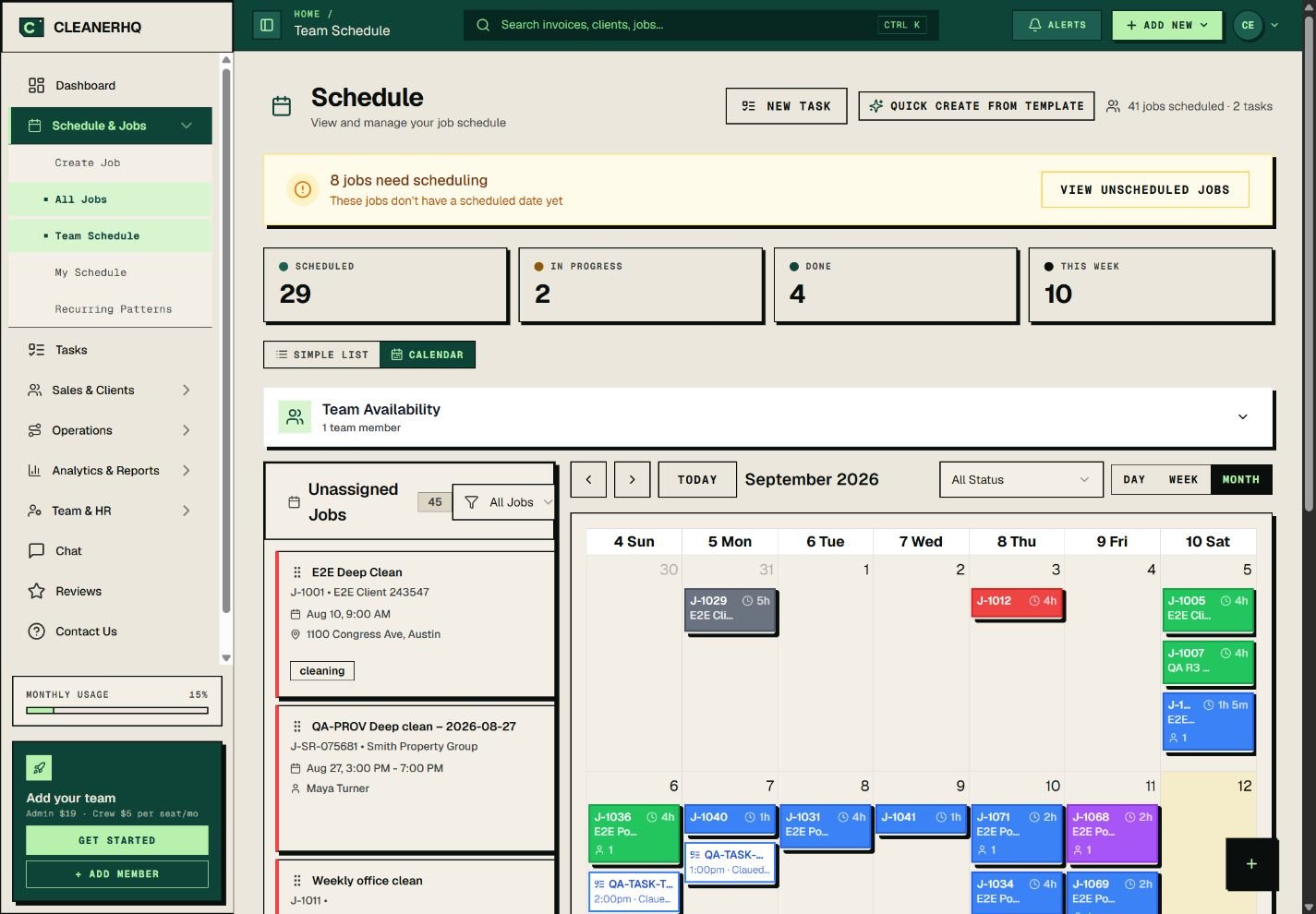
FIG 01 — The team schedule: statuses at a glance, list or calendar view, recurring patterns one click away.
Three-way conflict detection. Double-bookings get caught across crew, equipment, AND vehicles before they’re saved — not discovered in the parking lot.
Travel-time-aware buffers. The system pads time between jobs based on distance, so the 2:00 PM job doesn’t start with an apology.
Recurring engine with real exceptions. Weekly, biweekly, monthly, custom patterns — plus skip one occurrence, reschedule a single date, or override notes for one visit without touching the series.
Smart slot finder + AI advisor. Ask for a slot and get a recommendation with the reasoning attached (“keeps the route tight, uses your best crew for kitchen work”) — with a monthly budget cap built in, so AI can never become a surprise bill.
Capacity heatmap. Busy vs light days at a glance — see the hole in Thursday before it becomes a slow week.
Risk flags on every job. The system auto-flags jobs at risk of being unprofitable, too travel-heavy, or too labor-heavy — seven flags total, raised before the crew rolls.
Time-off and availability blocks. Vacations, training days, recurring days off — the slot finder respects them all. Multi-day jobs supported.
The schedule lives in your crew’s pocket.
A schedule your crew can’t see is a phone call waiting to happen. CleanerHQ ships a native iOS + Android crew app — included with every $5/month crew seat, not gated behind a top tier:
Today’s jobs, with everything attached. Times, addresses, gate codes, pet notes, checklists, and photo requirements — not just a time window.
GPS clock-in with geofencing. Crew clocks in at the job site, verified. Ghost Clock-Out automatically closes forgotten shifts so phantom hours never reach payroll.
“On my way” and “running late” buttons that text or email the client automatically — the number-one complaint killer in residential cleaning.
Offline-ready. Basements and dead zones happen; the app syncs deltas when signal returns instead of losing the day’s work.
AI Copilot in plain English. “Schedule John for Tuesday at 9 AM at the Smith property” — the app interprets and acts, with destructive actions requiring confirmation.
Photo proof-of-work on every job, plus push notifications for assignments and changes — no group-text archaeology.
Time tracking to payroll. GPS-verified hours flow straight into timesheets and payroll exports — see the full money stack.
Compare the app math
Launch27 gates its mobile app to the $299/mo Plus tier. Jobber charges $29 per additional user. ZenMaid gates GPS tracking to Pro and above. CleanerHQ’s native crew app is included in every $5 crew seat — a 10-person team pays $78/mo total, app and all.
What the cleaning-specific engine actually buys you.
| ADVANTAGE | WHAT IT MEANS DAY TO DAY |
|---|---|
| Fewer blown mornings | Three-way conflict detection means the crew, the extractor, and the van all actually exist when the job starts. Double-bookings die in the software, not on a client’s doorstep. |
| Less windshield time | Travel-aware buffers and route-ordered days cut the drive between jobs — and smart routing refuses to publish a route that falls below your profit threshold. |
| No phantom payroll hours | GPS-verified clock-in plus automatic Ghost Clock-Out for forgotten shifts — timesheets start from hours you can trust. |
| Sick-day resilience | Recurring routes with per-client preferred and excluded cleaners — when someone calls in, reassign the route in minutes, not the morning. |
| Crew app included, not upsold | Every $5 crew seat gets the native iOS/Android app. No per-user ladder, no top-tier gate. |
| One login, whole cycle | The schedule connects backward to quotes and forward to invoices — a won quote lands on the calendar, a completed job bills itself. |
Frequently asked about cleaning scheduling.
What is the best scheduling software for a cleaning business?
The best scheduling software for a cleaning business handles recurring routes (not just appointments), detects conflicts across crew, equipment, and vehicles, pads travel time between jobs, and puts the schedule in the crew’s pocket with a mobile app. CleanerHQ ships all of that at $19/admin and $5/crew seat. For the wider market view, see our best cleaning business software comparison.
What is the best scheduling app for cleaning crews?
For field crews, the app matters more than the calendar: today’s jobs with gate codes and notes, GPS clock-in, photo proof, and offline sync. CleanerHQ’s native iOS/Android crew app covers all four and is included with every $5 crew seat — several competitors gate their mobile app to top-price tiers.
How does CleanerHQ handle recurring cleaning schedules?
Industry-standard patterns — weekly, biweekly, monthly, and custom — with real exception handling: skip a single occurrence, reschedule one date, or override notes for one visit without touching the rest of the series. Per-client preferred and excluded cleaners are respected when the slot finder assigns crews.
Does the crew need full software licenses to see their schedule?
No. Crew members are $5/month seats with the native mobile app included — schedule, clock-in, photos, checklists, and chat. Full admin licenses ($19/month) are only for people who run the business.
Is there free scheduling software for cleaning businesses?
Free tools exist (Connecteam’s under-10-user plan is the best of them) but they schedule people to shifts, not jobs to clients — no customers, quotes, or invoices in the data model. Most operators outgrow them at the first recurring client. CleanerHQ’s 14-day trial is free with every module unlocked, which is the honest way to test.
How is this different from Jobber or ZenMaid scheduling?
Jobber’s calendar is polished but generic — no three-way conflict detection story for equipment and vehicles, and per-user pricing for every crew phone. ZenMaid’s recurring scheduling is genuinely strong for small residential shops, but GPS tracking gates to its Pro tier and it’s residential-only. Full breakdowns: vs Jobber and vs ZenMaid.
Put tomorrow’s route in everyone’s pocket.
Recurring routes, three-way conflict detection, AI slot advice, and a native crew app on every $5 seat. 14 days free, every module, no credit card.
$19/ADMIN SEAT · $5/CREW SEAT · NATIVE iOS + ANDROID APP INCLUDED · 0% PAYMENT MARKUP