Business Analytics: Your Profit Command Center
- Home
- Business Analytics: Your Profit Command Center
Business Analytics
See Every Dollar. Know Every Margin. Fix Every Leak.
Most cleaning business owners know their revenue but have no idea which jobs actually make money. CleanerHQ’s Business Analytics module transforms raw job data into real-time profit insights—showing you exactly where money is made, where it’s lost, and why.
See CleanerHQ Business Analytics in Action
Watch how cleaning business owners are tracking profitability with our intelligent analytics.
Demo video coming soon
The Profit Blindness Problem
You’re busy. You’re booking jobs. But you have no idea which jobs are profitable and which ones are bleeding you dry.
Profit Blindness
You see revenue, but you don’t see margin. Did that $2,500 job make you $800 in profit or cost you $200 in overruns? You’re flying blind.
Undetected Margin Leakage
Crews taking longer than estimated. Materials costing more than quoted. Drive time eating profit. You don’t find out until it’s way too late.
No Root Cause Visibility
Profit is down this month, but why? Are your estimates wrong? Are crews slow? Is it a client mix problem? You have no diagnostic tools.
Windshield Time Waste
You suspect crews spend too much time driving between jobs, but you can’t prove it. How much money are you losing to inefficient routing?
Reactive Management
By the time you realize a client or service type is unprofitable, you’ve already lost thousands. You need alerts, not hindsight.
The hard truth? You can’t fix what you can’t see. Without real-time profitability data, you’re managing by gut feeling instead of facts.
THE SOLUTION
Real-Time Financial Intelligence for Cleaning Businesses
CleanerHQ’s Business Analytics module captures job financials in real-time, providing instant visibility into revenue, costs, margins, and variances through intuitive dashboards and diagnostic tools.
See exactly where profit is made, where it’s lost, and why—so you can fix problems before they compound.
Key Features
Profitability Dashboard KPIs
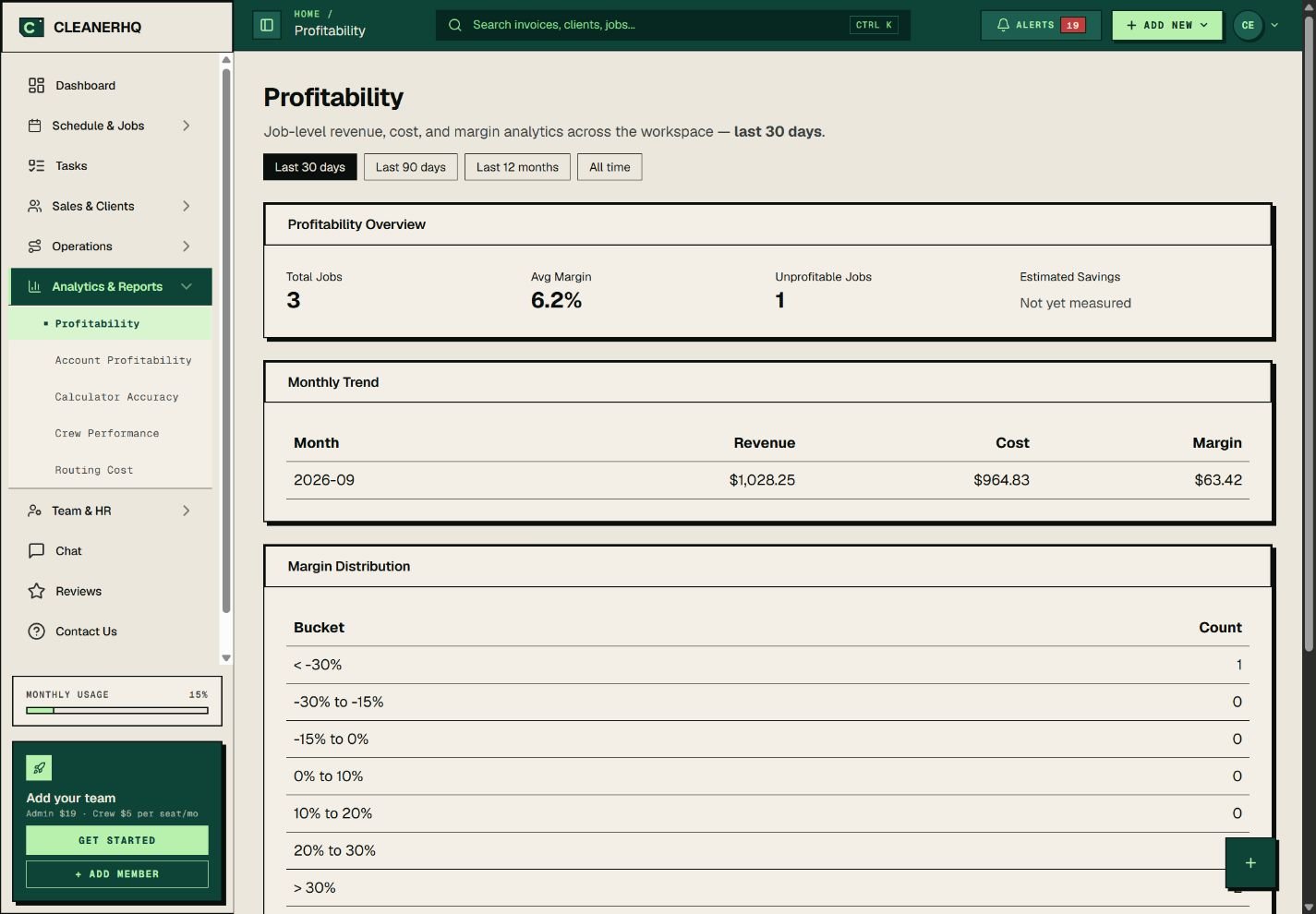
See Total Revenue, Total Cost, Gross Profit, and Gross Margin % at a glance. Track monthly trends with visual charts showing revenue vs. cost over time. Know your profitability instantly.
Unprofitable Jobs Alert Widget
Instantly spot jobs with negative margins or high variances. See which jobs cost more than quoted and investigate root causes immediately—before patterns repeat.
Margin Distribution Analysis
View profit margins across service types, job sizes, and client categories. Identify which services are most profitable and which ones drag you down.
Account Profitability Reports
See lifetime revenue, cost, and margin for every client. Identify your most valuable accounts and find clients who seem busy but actually lose you money.
Crew Performance Metrics
Compare estimated vs. actual labor hours by crew and team member. Identify efficiency gaps and reward top performers. See who’s hitting targets and who needs coaching.
Route Analytics & Windshield Time
Track drive time between jobs and quantify windshield waste. Optimize scheduling to reduce non-billable travel hours and increase crew productivity.
Frequently Asked Questions
I completed 200 jobs last month but profit seems lower than expected. How do I find out what's going wrong?
Start with the Unprofitable Jobs Alert Widget on your dashboard. This instantly surfaces jobs with negative margins or high cost variances. Click into any flagged job to see the detailed breakdown: estimated vs. actual labor hours, material costs, and drive time. You’ll immediately spot whether the issue is underestimating, crew inefficiency, material overruns, or excessive travel time.
How do I know which of my clients are actually profitable versus which ones just seem busy?
Use the Account Profitability Report to see lifetime revenue, total cost, and gross margin for every client. Sort by margin percentage to find your best and worst performers. You might discover that a client with 50 small jobs per year is less profitable than a client with 12 larger jobs—because the smaller jobs have higher overhead per visit. This data helps you decide which clients to prioritize for upsells and which to renegotiate pricing with.
My crews seem to take longer than I estimate. Is it the estimates or the crews?
Check the Crew Performance Metrics report. This compares estimated labor hours vs. actual labor hours for each crew and team member. If one crew consistently hits estimates while another runs 20% over, it’s a crew efficiency issue. If all crews consistently exceed estimates by the same percentage, your estimating formula needs adjustment. The report breaks down performance by service type, so you can see if specific job categories are systematically underestimated.
How much money am I losing to drive time between jobs?
The Route Analytics dashboard quantifies windshield time by crew and calculates the cost based on your labor rates. For example, if your crew spent 15 hours driving last week at $25/hour labor cost, that’s $375 in non-billable expense. The system also shows average drive time per job and highlights routes with excessive travel. Use this data to optimize scheduling—grouping jobs geographically can cut windshield time by 30% or more.
I want to share profitability data with my accountant. Can I export reports?
Yes. All reports in Business Analytics can be exported to CSV or PDF. The Job Profitability Report includes columns for job ID, client, service type, estimated cost, actual cost, revenue, margin %, and variance. The Account Profitability Report includes client name, total jobs, total revenue, total cost, and lifetime margin. Export the data and share directly with your accountant or bookkeeper for reconciliation and tax planning.
Have more questions about the Business Analytics module? Contact our support team at support@cleanerhq.com or visit our help center.
WHY WE'RE #1
Stop Guessing. Start Knowing.
See exactly where your profit comes from—and where it’s leaking away.
No credit card required